
When was the last time you cleaned your sewing machine?
If your answer is something along the lines of…
Ummmm.
You’re probably not alone.
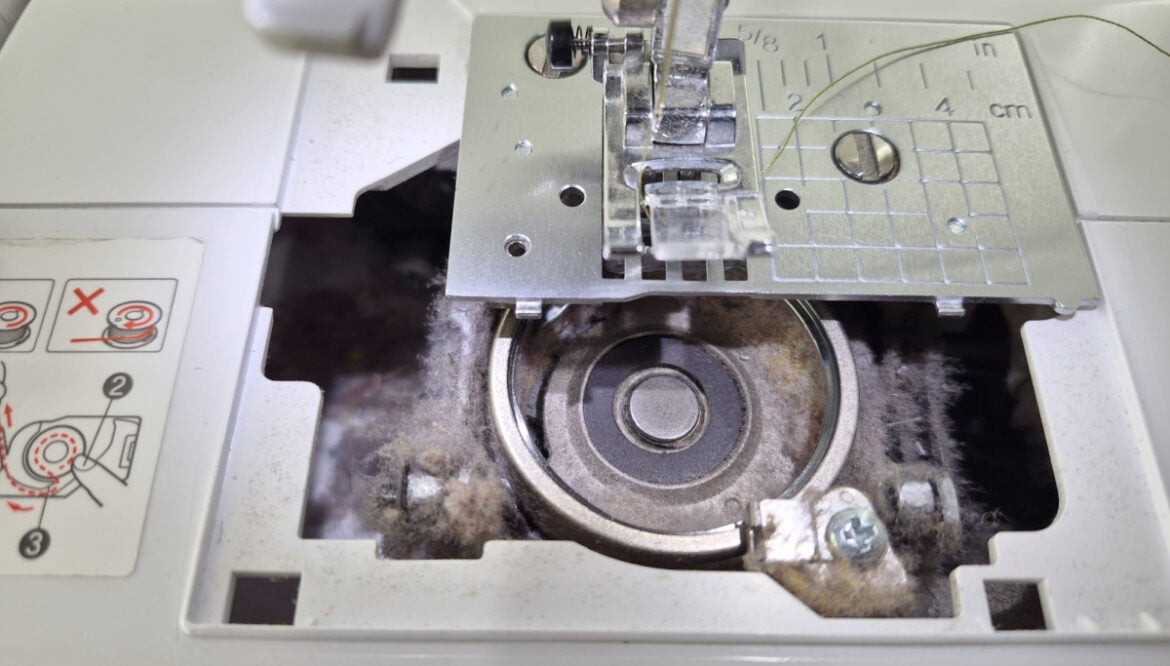
I can be happily sewing along and not think one bit about cleaning my machine — until I change the bobbin and discover enough lint hiding down there to practically make another piece of batting.
That’s why I like having a simple way to keep track of sewing machine maintenance.
This free Sewing Machine Maintenance Tracker gives you one place to keep track of when you cleaned your machine, oiled it, changed the needle and had it professionally serviced.
Nothing complicated.
Just a little reminder to take care of the machine that does a whole lot of work for us.
Why Sewing Machine Maintenance Matters
Your sewing machine collects lint, thread bits and dust while you sew — especially if you’re quilting a lot.
Over time, all that fuzz can build up around the bobbin area and other parts of your machine.
A quick cleaning every so often can help keep things running smoothly — and it’s also one of the first things I check when my machine suddenly starts acting a little grumpy.
Skipped stitches?
Funny noises?
Thread doing something completely ridiculous?
Before I start turning tension knobs and blaming the machine, I check the simple things first.
Clean the bobbin area.
Rethread the machine.
Check the needle.
Sometimes that’s all it takes.
How Often Should You Clean Your Sewing Machine?
There isn’t one perfect schedule for every machine or every quilter.
Someone sewing every day is going to collect lint a whole lot faster than someone sewing once or twice a month.
The fabric, batting and thread you’re using can make a difference too.
I like to keep an eye on the bobbin area and give it a cleaning when it starts collecting lint rather than waiting until the machine complains.
For oiling and professional servicing, check the recommendations for your specific machine.
That’s really the point of the tracker.
You don’t have to remember when you did everything.
Write it down.
Grab the Free Sewing Machine Maintenance Tracker
Print the tracker and keep it somewhere near your sewing machine.
Then when you clean the machine, change the needle, oil it or take it in for servicing — mark it down.
It’s one tiny sewing-room habit that can save you from the:
When did I last do that?!
moment later.
You can grab the Sewing Machine Maintenance Tracker free inside my Quilter’s Resource Library.
Print one for each machine and tuck it near your sewing space so it’s actually there when you need it.
Then clean out that bobbin area.
You might be surprised by what’s living in there.

What to Track on Your Sewing Machine Maintenance Sheet
1- Sewing Machine Brand, Model and Weight.
What machine is this? Make sure you fill this out! There are many machines in a quilters room and you don’t want to get them confused when it comes to cleaning and maintaining them. There may be a moment when you don’t remember if it was the Juki that got the last service or the Brother. So, fill this area in to save you some grief later.

2- Date, Professionally Cleaned, Cleaned, Oiled, New Needle
This is the table that you’ll fill out multiple times, depending on the service you do. You can put the date on the side and then check box the ones that were done…. OR you can put the date directly under the item on the list. Either way will totally work.
There is a difference between professionally cleaned and cleaned. Professionally means you paid someone to clean it. You probably drove the machine somewhere and dropped it off for a few weeks. Depending on the machine, this may happen every year, or based on how many stitches or if you are running into issues.
The simple Cleaned spot is for you to mark when you have cleaned the machine. If you took the bobbin out and gave it a good clean out. Got rid of the lint and such. Nothing as deep as the professional, but still something that counts.
You’ll also track when you oiled it (usually it’s the same day as the cleaning) but just in case you are able to track that separately.
New needle will happen at random and usually doesn’t follow a schedule. You can mark down the date here as well.

3- Notes
This area is for you to write down any notes that you would like to track. Did it go into the shop for a specific reason? Skipping stitches, the timing is off or whatever. Maybe you want to write down exactly how to clean or where to put the oil for this specific machine (some machines are different then others). You may want to write down when you bought new bobbins, what size they are, etc.
Use it to jot down things like:
- skipped stitches
- unusual noises
- tension problems
- bobbin issues
- what size bobbin your machine uses
- a repair that was made
- something your sewing machine technician told you
- anything unusual you’ve noticed
Then you’ve got a little history of the machine instead of trying to remember everything later.

You will find the Sewing Machine Maintain Tracker in the Quilt Library here. If you don’t have the password to access it (and other printables as well) then sign up here – it’s free for access info.
*It is color, but depending on your printer it may print in color or in grey scale.


Thank you for the work sheets and planning sheets. I wish I had them for the last few years. They will come in handy as I rearrange my stash. I have been putting kits together but not complete. A list will give me the heads up before I start. Thank you.